



Description
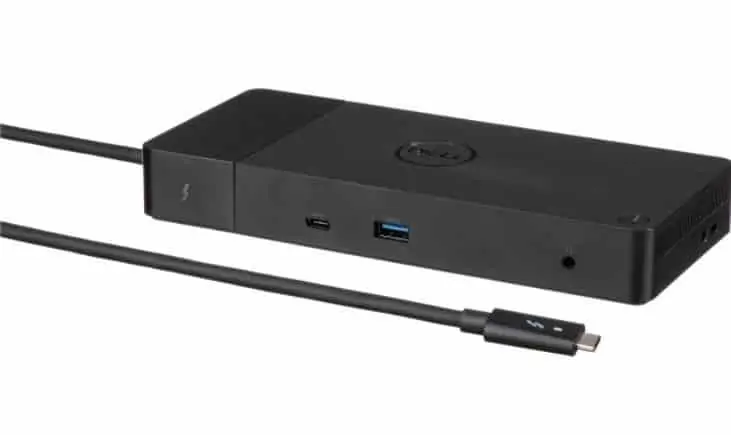
Dell Thunderbolt Dock WD19TBS
Dell Thunderbolt Dock WD19TBS offers the greatest compatibility across Dell Commercial laptops.
Other manufacturers’ laptops that support Thunderbolt docking industry standards, such HP and Lenovo, are also compatible with the WD19TBS dock.
Boost the connections you have
Power your day: Dell ExpressCharge is the most effective approach to organize your workday because it can charge your device up to 80% in an hour.
Energize your workload: Also, With Dell ExpressCharge Boost, a feature that charges a device to up to 35% in just 20 minutes, you can accomplish more in less time.
Unmatched charging: Increase your power delivery and charge even faster with a dock that delivers up to 130W of power .
Dell Thunderbolt Dock WD19TBS Built for the future
Additionally, When it comes time to upgrade your systems or perform field replacements, the future-ready architecture makes it simple to swap out modules.
Ultimate connectivity: Thunderbolt Dock connectivity makes it easier than ever to deliver power, data, audio and video as well as connect to system peripherals, no matter what system you use.
Moreover, with support for up to three displays, including a single 5K and dual 4K monitors , you can connect to everything you need.
Clean and clutter-free: Stay productive by mounting your dock behind your monitor or under your desk with the optional, secure VESA Mount, that offers the complete flexibility with the built-in 0.8-meter cable.
Information in a flash: With data transfer speeds of up to 40Gbps for faster data transfer, you can stay productive when connected to all your devices.
Optimize your workspace
Additionally, with Dell Client Command Suite and Microsoft System Center Configuration Manager, you can quickly and easily update your firmware without rebooting your dock.
Secure manageability: Keep your information safe with MAC Address pass-thru and remote port-disablement.
Dell Thunderbolt Dock WD19TBS Connectivity options
1. USB-C 3.1 Gen 2 | 2. USB-A 3.1 Gen 1 with PowerShare | 3. DisplayPort 1.4 (2) | 4. HDMI 2.0b | 5. USB-C Multifunction DisplayPort | 6. Dual USB-A 3.1 Gen 1 | 7. Gigabit Ethernet RJ45 | 8. Power In | 9. Thunderbolt 3
Advanced Exchange Service
Your dock comes with a 3-year Advanced Exchange Service so that if a replacement becomes necessary, it will be shipped to you the next business day during your 3 year Limited Hardware Warranty.
Dell Thunderbolt Dock WD19TBS Tech Specs
Product Type : Docking station
Docking Interface : USB-C / Thunderbolt 3
Video Interfaces : HDMI, 2 x DP, Thunderbolt, USB-C
Dimensions (WxDxH) : 8.1 in x 3.5 in x 1.1 inDell Thunderbolt Dock WD19TBS Weight : 20.63 oz
Color : Black
Networking : Gigabit Ethernet
Power : Power adapter 180 Watt AC 120/230 V (50/60 Hz)
Manufacturer Warranty : 3-year warranty
Width : 8.1 in
Depth : 3.5 in
Dell Thunderbolt Dock WD19TBS Height : 1.1 in
Max Resolution Details : 5120 x 2880 – 60 Hz
Data Link Protocol : Ethernet, Fast Ethernet, Gigabit Ethernet
- 2 x display / video – DisplayPort – 20 pin DisplayPort
- 1 x display / video – HDMI – 19 pin HDMI Type A
- 1 x USB-C
- 3 x USB 3.1 Gen 1 – 9 pin USB Type A
- 2 x USB-C 3.1 Gen 2
- 1 x network – Ethernet 1000 – RJ-45
- 1 x Thunderbolt 3 – Thunderbolt – 24 pin USB-C
Cables Included : 1 x dual USB-C cable – 2.6 ft
Features : Security lock slot (cable lock sold separately), 210W power delivery to Dell systems, 90W power delivery to non-Dell systems, wireless vPro
Security Slot Type : Noble Wedge security slot / Kensington security slot
Power Device : Power adapter
Dell Thunderbolt Dock WD19TBS Voltage Required : AC 120/230 V (50/60 Hz)
Power Provided : 180 Wat
OS Required : Red Hat Enterprise Linux, Windows 10, Ubuntu 18.04
Service & Support : Limited warranty – 3 years
Ask us For Dell Thunderbolt Dock WD19TBS Price From Egypt Quotation
Also, At Elite you will find the best specs with the best prices in the Egyptian market
Elite Technology Based, Build Your Environment
If you searching for More Dell Docking Station products :
- Dell Thunderbolt 4 Docking Station WD22TB4
- Dell Performance Dock WD19DC Docking Station
- Dell Dual Charge HD22Q Dock
- Dell Performance Dock WD19DCS
- Dell Pro Thunderbolt 4 Dock SD25TB4
- Dell Pro Dock Station WD25
- Dell Pro Smart Dock SD25
- Dell Pro Dock WD25Z
- Dell Pro Thunderbolt 5 Dock WD25TB5
- Dell Pro Thunderbolt 4 Dock WD25TB4


