


Description
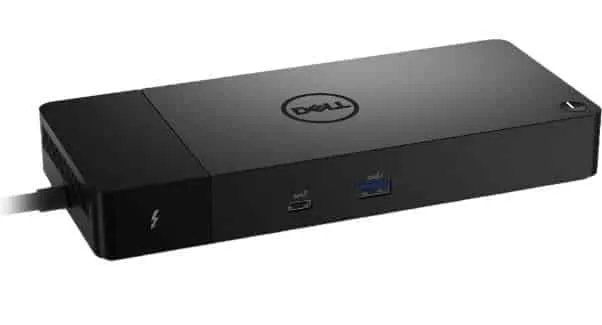
Dell Thunderbolt 4 Docking Station WD22TB4 with swappable modules for easy upgrades and SuperBoost technologies for fast charging and good Specs .
ExpressCharge technology
You’ll experience power delivery of up to 130W on Dell devices with ExpressCharge technology that enables :
- 80% charge in one hour
- 35% charge in just 20 minutes
Future-made design
- Swappable module lets you upgrade with ease to meet the needs of your IT environment.
- Upgrade to get the latest in connectivity with not one but two Thunderbolt 4 ports for even more flexibility.
Multiply productivity
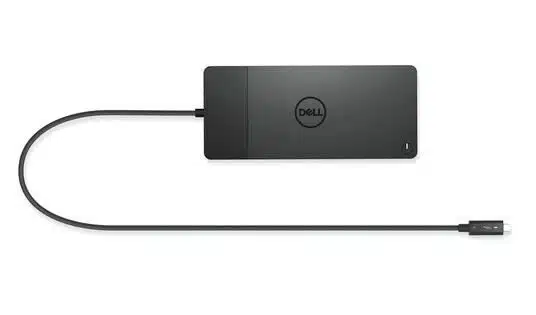
Connect displays and peripherals to your system with a single cable for ultimate productivity.
Dell Thunderbolt 4 dock with the highest number of ports connects multiple 4K displays and Thunderbolt peripherals allowing you to not compromise with your work setup.
Get the maximum from your peripherals with data transfer of 40 GB/s.
Intelligent and simple management
Work without disruption : Firmware updates can be completed in five to seven minutes without needing to reboot the system.
Easier for IT : Dell Client Command Suite and Microsoft System Center Configuration Manager offers a smoother firmware update experience.
You can also streamline deployment and management with a single firmware.
Easier upgrades : Modularity allows for simple field replacement of the power cable or connectivity module.
Better support : Inventory management got easier since each has its own service tag, allowing IT to push firmware updates only to certain dock.
Secure manageability : Keep your information safe with MAC Address pass-thru and remote port-disablement.
Plus, with features like PXE Boot, Wake-on-LAN, and more, it’s easier than ever to stay productive while managing your dock.
Industry standard compatibility
Dell Thunderbolt Docking WD22TB4 offers wide compatibility across Dell Commercial laptops.
It is is also compatible with notebooks from other manufacturers which support industry standards for Thunderbolt docking.
Dell Thunderbolt 4 Docking Station Specs
- 130W (Dell systems)
- 90W (non-Dell systems)
- 5K – 60 Hz (Single Display)
- 4K – 60 Hz (Quad Display)
Interfaces : 2 x Thunderbolt 4
OS Required : Windows 10, Windows 11, Ubuntu 20.04 or later
Product Type : Docking station
Dell Thunderbolt 4 Docking Station Width : 8.1 in
Depth : 3.5 in
Height : 1.1 in
Dell Thunderbolt 4 Docking Station Weight : 22.93 oz
Max Resolution Details :
- 5K – 60 Hz (Single Display)
- 4K – 60 Hz (Quad Display)
Data Link Protocol : Ethernet, Fast Ethernet, Gigabit Ethernet
Interfaces :
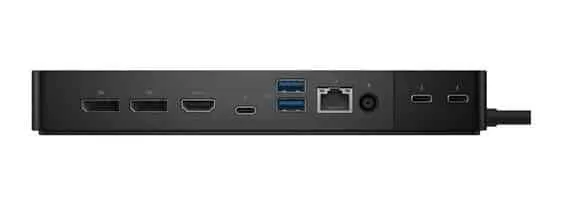
- 2 x display / video – DisplayPort – 20 pin DisplayPort (1.4)
- 1 x display / video – HDMI – 19 pin HDMI 2.0
- 1 x USB-C 3.2 Gen 2/DisplayPort 1.4
- 2 x USB 3.2 Gen 1 – 9 pin USB Type A
- 1 x USB-C 3.2 Gen 2
- 1 x network – Ethernet 1000 – RJ-45
- 1 x USB 3.2 Gen 1 with PowerShare
- 2 x Thunderbolt 4
Dell Thunderbolt 4 Docking Station Features :
Security lock slot (cable lock sold separately), 130W power delivery to Dell systems, 90W power delivery to non-Dell systems
Security Slot Type : Noble Wedge security slot / Kensington security slot
Compliant Standards : DisplayPort 1.4
Power Device : Power adapter
Voltage Required : AC 120/230 V (50/60 Hz)


